
How to Recognize Phishing Links in Messaging Apps
Phishing links in messaging apps are a growing threat, designed to steal personal data. Recognizing these deceptive links involves scrutinizing sender identity, URL anomalies, and suspicious content to safeguard your information effectively.

Dating App Subscriptions: What to Check Before Paying for Premium?
Before committing to dating app subscriptions, carefully evaluate premium features, pricing structures, privacy policies, and your personal dating goals to ensure a worthwhile investment and enhanced experience.

How to Share Your Screen Without Showing Private Notifications
Effectively sharing your screen during video calls while maintaining privacy requires disabling notifications, managing open applications, and utilizing dedicated software features to prevent accidental exposure of personal information.

Zoom Waiting Rooms & Passcodes: Personal Call Security
Mastering Zoom's waiting rooms and passcodes is crucial for securing your personal video calls, preventing unwanted intrusions, and ensuring private conversations, making your online interactions safer and more controlled for family and friends.

Messaging App Backups: Essential Questions Before Saving Chats
Understanding the nuances of messaging app backups is crucial for safeguarding your digital conversations, encompassing vital considerations like data encryption, storage location, and ease of recovery to ensure your chat history remains secure and accessible.
Manage Linked Devices: WhatsApp & Signal Security Guide
Effectively managing linked devices in WhatsApp and Signal is crucial for maintaining digital privacy and security. This guide provides comprehensive steps to review, add, and remove devices, ensuring your communications remain secure and under your control.

Share Photos Securely: Avoid Exposing Details in Messaging Apps
Effectively sharing photos in messaging apps while safeguarding personal privacy involves utilizing app-specific privacy settings, employing metadata removal tools, and adopting cautious sharing habits to prevent unintended exposure of sensitive information.

WhatsApp Privacy: Set Up Without Sharing More Info
Setting up WhatsApp discreetly involves adjusting privacy settings during initial configuration and ongoing usage to control who sees your profile picture, last seen, status, and 'about' information, minimizing data sharing.
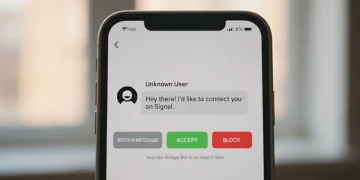
Signal Message Requests: Review, Accept, Block Conversations
Effectively managing Signal message requests is crucial for maintaining privacy and control over your digital conversations. This guide provides clear steps on how to review, accept, and block unwanted messages, ensuring a secure messaging experience.