How to Reduce Unwanted Contact: Blocking and Privacy Controls
Effectively reducing unwanted contact involves leveraging blocking features and privacy settings on digital platforms to control who can reach you and how your personal information is shared, enhancing your online safety.
In our increasingly interconnected world, managing digital interactions is crucial for personal well-being. Learning how to reduce unwanted contact is no longer a luxury but a fundamental skill for navigating online spaces safely and comfortably. This comprehensive guide will empower you with the knowledge and tools to take control of your digital boundaries.
Understanding the Need for Digital Boundaries
The digital age has blurred the lines between public and private, making it easier than ever for individuals to connect. However, this accessibility also opens the door to unsolicited messages, harassment, and privacy breaches. Establishing clear digital boundaries is essential for maintaining mental peace and protecting your personal information.
Unwanted contact can manifest in various forms, from persistent marketing emails and spam calls to more insidious forms like cyberstalking or online harassment. Recognizing these threats is the first step toward effective mitigation. Many platforms offer robust tools designed to help users manage their interactions, but often, these features go unused or are not fully understood.
The Impact of Unwanted Digital Interactions
The constant barrage of unwanted messages or the fear of harassment can significantly impact an individual’s digital experience and overall well-being. It can lead to increased stress, anxiety, and a reluctance to engage with online communities, even those that are beneficial. Understanding the psychological toll is key to prioritizing proactive measures.
- Mental Health Strain: Persistent unwanted contact can contribute to anxiety, stress, and even depression, making online spaces feel unsafe.
- Privacy Concerns: Unsolicited messages often stem from data breaches or oversharing, leading to concerns about personal information security.
- Time Consumption: Dealing with spam and unwanted communications can be a significant drain on time and productivity.
- Erosion of Trust: Repeated negative interactions can erode trust in online platforms and other users, fostering a sense of isolation.
By actively managing who can contact you and what information they can access, you create a safer and more enjoyable online environment. This proactive approach not only protects you from immediate threats but also fosters a healthier relationship with technology.
Mastering Blocking Features Across Platforms
Blocking is perhaps the most direct and effective way to cease unwanted contact from specific individuals. While the exact steps may vary slightly between platforms, the core functionality remains consistent: preventing a user from communicating with you or seeing your activity. Understanding how to utilize this feature on different platforms is crucial.
Most social media networks, messaging apps, and email services offer a blocking option. It’s important to remember that blocking is a two-way street; once you block someone, they typically cannot contact you, and you cannot contact them either. This immediate cessation of interaction provides a powerful sense of control.
Blocking on Social Media Platforms
Social media sites like Facebook, Instagram, Twitter, and LinkedIn have sophisticated blocking mechanisms. Generally, you can find the option to block a user by visiting their profile and looking for a menu icon (often three dots or lines). Once blocked, the user usually cannot view your profile, send you messages, or see your posts.
- Facebook: Navigate to the user’s profile, click the three-dot menu, and select ‘Block.’ You can also manage your blocked list in your privacy settings.
- Instagram: Go to the user’s profile, tap the three-dot menu in the top right corner, and choose ‘Block.’ Instagram also offers an option to restrict accounts, which is a softer form of blocking.
- Twitter (X): On a user’s profile or tweet, click the three-dot menu and select ‘Block.’ This prevents them from seeing your tweets and you from seeing theirs.
- LinkedIn: Visit the member’s profile, click the ‘More’ button, and select ‘Report/Block.’ Blocking on LinkedIn is more about professional boundaries.
It’s beneficial to periodically review your blocked lists to ensure they are up-to-date and that no unwanted contacts have slipped through the cracks. Knowing these steps helps to efficiently reduce unwanted contact and maintain your digital peace.
Leveraging Privacy Controls for Proactive Protection
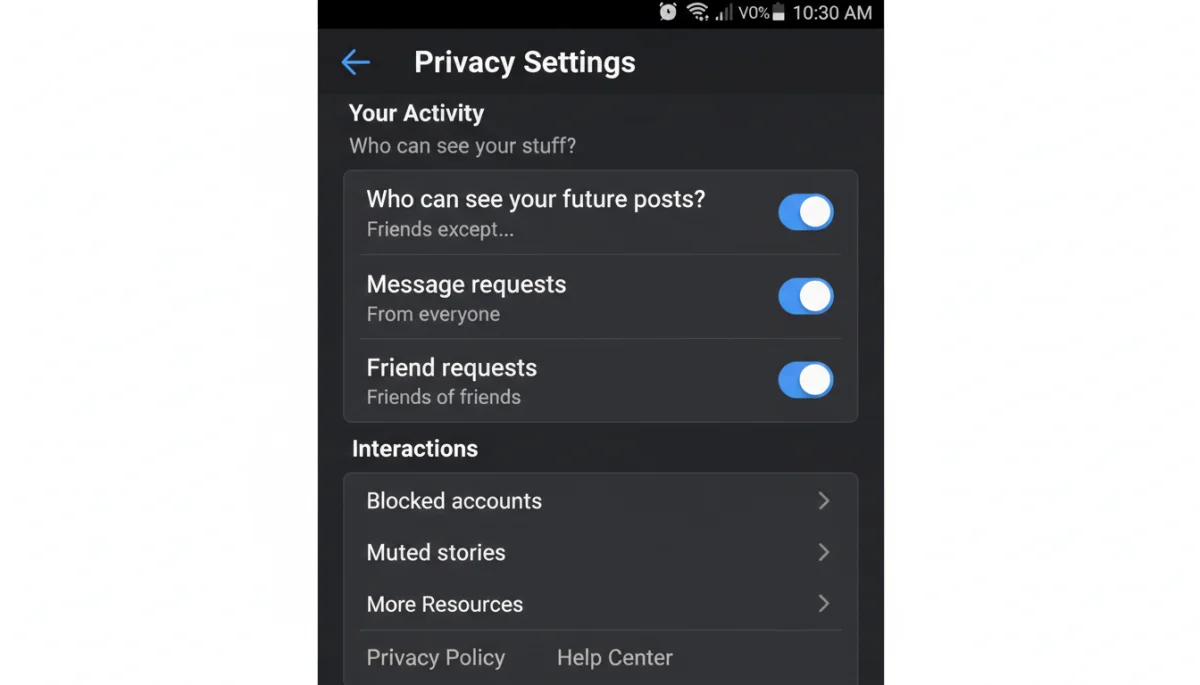
Beyond direct blocking, privacy controls are your first line of defense against unwanted contact. These settings allow you to dictate who can see your information, who can send you messages, and how your profile appears to others. Proactive management of these settings can significantly reduce the likelihood of unsolicited interactions.
Each platform, from email services to dating apps, has a dedicated privacy section. Taking the time to explore and customize these settings according to your comfort level is an investment in your digital safety. Many users simply accept default settings, which often prioritize connectivity over privacy.
Essential Privacy Settings to Review
Regularly auditing your privacy settings is a habit worth cultivating. Focus on areas that control visibility and communication. Consider what information is truly necessary for public consumption and what should remain private. This includes everything from your phone number to your relationship status.
- Profile Visibility: Control who can see your profile information, posts, and photos. Options often range from ‘Public’ to ‘Friends Only’ or ‘Private.’
- Message Requests/Filters: Configure who can send you direct messages. Many platforms allow you to filter messages from unknown senders into a separate folder or block them entirely.
- Friend/Follower Requests: Adjust settings to control who can send you friend or follow requests, preventing random or suspicious accounts from easily connecting.
- Location Sharing: Disable location tracking for apps that don’t require it, as this can inadvertently reveal your whereabouts to others.
- Searchability: Some platforms allow you to control whether your profile appears in search results, making it harder for strangers to find you.
By diligently managing these privacy settings, you build a robust barrier against unwanted intrusions, making it much harder for individuals to initiate contact without your consent. This is a powerful way to reduce unwanted contact before it even begins.
Managing Communication Preferences and Notifications
Unwanted contact isn’t always malicious; sometimes it’s simply an overwhelming volume of notifications or messages from groups and services you no longer wish to engage with. Managing your communication preferences and notification settings is an often-overlooked aspect of digital boundary setting.
Many apps and websites default to sending a wide array of notifications, from promotional emails to updates about activity you might not care about. Taking control of these preferences can significantly reduce the digital noise and help you focus on what truly matters. This also extends to managing group chats and mailing lists.
Customizing Your Notification Settings
Each application typically has a dedicated section for notification management. This allows you to fine-tune what alerts you receive and how you receive them (e.g., email, push notification, in-app). Prioritize notifications from essential contacts and silence the rest.
- Email Subscriptions: Regularly unsubscribe from newsletters and promotional emails you no longer read. Look for the ‘unsubscribe’ link at the bottom of these emails.
- App Notifications: Go into your phone’s settings and adjust notification permissions for each app. You can often disable banner alerts, sounds, and vibrations for less important apps.
- Group Chat Settings: Mute or leave group chats that are no longer relevant or have become overwhelming. Many messaging apps offer options to mute notifications for a set period or indefinitely.
- In-App Preferences: Within social media and messaging apps, explore their specific notification settings. You might be able to turn off notifications for specific types of activity, like ‘likes’ from people you don’t follow.
By actively curating your notification experience, you create a more peaceful digital environment. This not only helps to reduce unwanted contact but also improves your overall digital well-being by minimizing distractions and information overload.
Reporting and Escalating Unwanted Interactions
While blocking and privacy settings are powerful preventative measures, sometimes unwanted contact escalates to harassment or other harmful behaviors. In such cases, knowing how and when to report and escalate these interactions is crucial for your safety and the safety of others.
Most online platforms have clear reporting mechanisms designed to address violations of their terms of service. These can include hate speech, harassment, impersonation, and threats. Reporting not only helps protect you but also contributes to creating a safer online community for everyone. Do not hesitate to use these tools when necessary.
Steps for Reporting Unwanted Contact
When you encounter severe or persistent unwanted contact, documenting the interaction and reporting it to the platform is essential. Many platforms take these reports seriously and may take action against the offending user, ranging from warnings to permanent bans.
- Document Evidence: Take screenshots, save messages, and record dates and times of the unwanted contact. This evidence will be vital for your report.
- Use In-App Reporting Tools: Most platforms have a ‘Report’ button or option associated with specific posts, messages, or user profiles. Follow the prompts to submit your report.
- Contact Support Directly: If in-app reporting feels insufficient or if the issue is complex, look for the platform’s help center or customer support contact information to submit a more detailed complaint.
- Involve Law Enforcement (If Necessary): For threats, cyberstalking, or other illegal activities, do not hesitate to contact local law enforcement. Provide them with all documented evidence.
- Block the User: After reporting, immediately block the individual to prevent further contact while the platform investigates.
Understanding these steps provides a clear path forward when preventative measures are not enough. It empowers you to take decisive action to reduce unwanted contact and protect yourself from harm, ensuring that online spaces remain safe and respectful.
Advanced Strategies for Digital Safety
Beyond the fundamental blocking and privacy controls, several advanced strategies can further enhance your digital safety and help you reduce unwanted contact. These involve being mindful of your digital footprint, using tools for anonymity, and educating yourself on emerging threats. A multi-layered approach to security is always the most effective.
Consider your online presence as a whole. Every piece of information you share, every account you create, contributes to your digital footprint. Minimizing this footprint, where appropriate, can significantly reduce the avenues through which unwanted contact might originate. This also includes being cautious about third-party applications and websites.
Proactive Measures and Tool Utilization
Adopting a proactive mindset towards digital safety means regularly assessing your exposure and utilizing available technologies to mitigate risks. This isn’t about paranoia, but rather about informed decision-making in a complex digital landscape.
- Reviewing App Permissions: Regularly check which apps have access to your contacts, location, microphone, and camera. Revoke permissions for apps that don’t genuinely need them.
- Using VPNs: A Virtual Private Network (VPN) can mask your IP address and encrypt your internet traffic, adding a layer of anonymity and making it harder for others to track your online activity.
- Creating Strong, Unique Passwords: Strong passwords and two-factor authentication (2FA) for all accounts are non-negotiable. This prevents unauthorized access to your profiles, which could be exploited for unwanted contact.
- Being Mindful of Information Sharing: Think twice before sharing personal details like your full birthdate, home address, or daily routines on public platforms. Even seemingly innocuous details can be pieced together.
- Utilizing Burner Accounts/Emails: For sign-ups to services you don’t fully trust or for temporary interactions, consider using a secondary email address or a temporary phone number.
By implementing these advanced strategies, you create a more resilient defense against unwanted contact, ensuring your digital interactions are on your terms. This holistic approach empowers you to navigate the digital world with greater confidence and security.
Cultivating a Secure Digital Lifestyle
Ultimately, effectively learning how to reduce unwanted contact is about cultivating a secure digital lifestyle. This involves a continuous process of awareness, adaptation, and proactive management of your online presence. It’s not a one-time setup but an ongoing commitment to your digital well-being.
The digital landscape is constantly evolving, with new threats and new tools emerging regularly. Staying informed about best practices, understanding the privacy policies of the platforms you use, and being vigilant about your interactions are all part of this secure lifestyle. Empowering yourself with knowledge is your strongest defense.
Key Habits for Ongoing Digital Safety
Building consistent habits around digital safety will serve you well in the long run. These practices become second nature, allowing you to enjoy the benefits of online connectivity without constant worry about unwanted intrusions. Consistency is key to maintaining a strong digital defense.
- Regular Privacy Audits: Periodically review all your privacy and security settings on frequently used apps and platforms.
- Mindful Sharing: Before posting, ask yourself if the information is truly necessary to share publicly and consider the potential implications.
- Educating Yourself: Stay updated on common online scams, phishing attempts, and new privacy features offered by your favorite platforms.
- Strong Password Hygiene: Use a password manager and enable two-factor authentication (2FA) wherever possible.
- Trust Your Gut: If an interaction or request feels off, it probably is. Don’t hesitate to block, report, or simply disengage.
By embracing these habits, you not only learn how to effectively reduce unwanted contact but also foster a healthier, more secure, and ultimately more enjoyable relationship with your digital life. Your peace of mind in the online world is a priority worth protecting.
| Key Strategy | Brief Description |
|---|---|
| Master Blocking | Directly prevent specific users from contacting you or viewing your activity across platforms. |
| Utilize Privacy Controls | Customize who sees your information and can initiate contact, proactively setting digital boundaries. |
| Manage Notifications | Filter and silence non-essential alerts and messages to reduce digital noise and distractions. |
| Report Harassment | Document and report severe unwanted interactions to platforms and, if needed, law enforcement. |
Frequently Asked Questions About Reducing Unwanted Contact
The most effective way is to use the blocking feature available on almost all digital platforms. This prevents the individual from sending you messages, viewing your profile, or interacting with your content. It’s an immediate and comprehensive solution to cease direct contact.
Proactively managing your privacy settings is key. Limit who can view your profile, send you messages, or find you through search. Reviewing app permissions and being mindful of information shared publicly also significantly reduces potential avenues for unsolicited contact.
Generally, most platforms do not send an explicit notification that a user has been blocked. However, the blocked individual may infer they’ve been blocked if they can no longer find your profile, send you messages, or see your activity. The exact behavior varies by platform.
Document all evidence by taking screenshots and saving messages. Report the incident immediately to the platform’s support team using their official reporting tools. If the contact involves threats or illegal activities, contact local law enforcement for assistance and guidance.
Privacy controls should be reviewed regularly, not just once. Platforms frequently update their settings and introduce new features, which can sometimes alter your privacy defaults. A quarterly review ensures your settings remain aligned with your preferences and current safety needs.
Conclusion
Effectively managing your digital interactions and knowing how to reduce unwanted contact is paramount for a healthy online experience. By mastering blocking features, diligently utilizing privacy controls, and proactively managing your communication preferences, you can create a safer and more enjoyable digital environment. Remember, your digital well-being is in your hands, and with the right tools and habits, you can navigate the interconnected world with confidence and peace of mind.
