Group Chat Permissions: Master Member Management & Settings

Effectively managing group chat permissions is crucial for controlling who can add members and change settings, ensuring a secure and well-organized communication environment.
In today’s interconnected world, group chats have become indispensable for communication, whether for family, friends, or work teams. However, the convenience they offer can quickly turn into chaos if not properly managed. Understanding group chat permissions—specifically who can add members and change settings—is paramount to maintaining order, privacy, and relevance within your digital communities.
Understanding the Basics of Group Chat Permissions
Group chat platforms, from WhatsApp to Telegram, Signal, and Slack, offer varying degrees of control over who can manage the group. These permissions dictate critical aspects such as adding new members, changing the group name or icon, and even sending messages. Without a clear understanding of these settings, group administrators might inadvertently expose their groups to unwanted participants or disruptive changes.
The core concept behind these permissions is to empower group creators and designated administrators with the tools needed to steer the group’s direction. This is not merely about authoritarian control; it’s about fostering an environment where conversations can thrive without constant moderation issues. Proper permission settings can prevent spam, maintain the group’s focus, and protect member privacy.
The Role of Group Administrators
Group administrators are the custodians of the chat. They typically have elevated privileges that allow them to override default settings and enforce specific rules. These roles are often assigned by the group creator, but some platforms allow for multiple administrators to share the workload. Understanding what an administrator can and cannot do is the first step in effective group management.
- Adding and Removing Members: Admins can invite new participants and, crucially, remove those who violate group rules or are no longer relevant.
- Modifying Group Information: This includes changing the group’s name, description, and profile picture, ensuring it accurately reflects the group’s purpose.
- Managing Message Flow: Some platforms allow admins to restrict who can send messages, turning a chat into an announcement-only channel when needed.
- Granting/Revoking Admin Status: Admins can promote other members to administrator roles or demote them, sharing or centralizing control as appropriate.
The responsibilities of an administrator are significant, as their actions directly impact the group’s functionality and atmosphere. Therefore, choosing administrators wisely is a critical decision that influences the long-term health of any group chat.
In essence, group chat permissions are the rulebook that governs interaction within these digital spaces. By familiarizing yourself with these foundational elements, you can ensure your group chats remain productive, secure, and enjoyable for all participants. This initial understanding sets the stage for delving into the specifics of member management and setting modifications across various platforms.
Who Can Add Members? Default Settings vs. Admin Control
One of the most frequent questions regarding group chat permissions revolves around who has the authority to add new members. This seemingly simple setting has profound implications for group privacy, security, and overall dynamics. Different messaging applications offer various default settings and customization options, which can significantly impact how your group grows and functions.
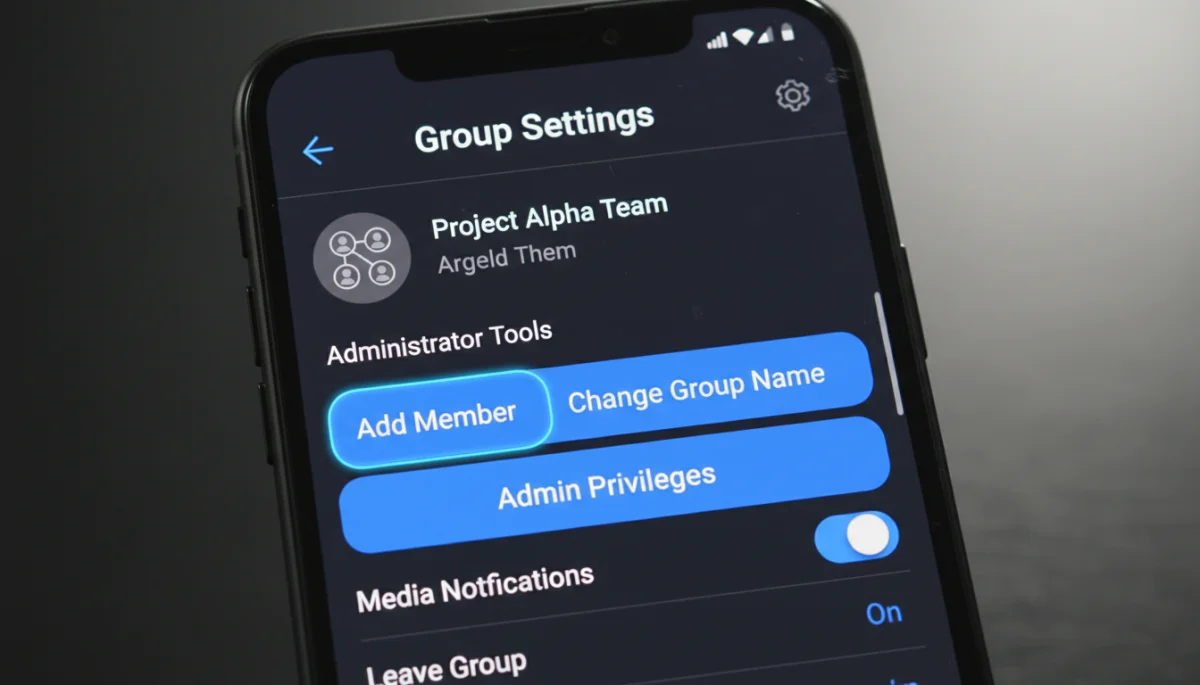
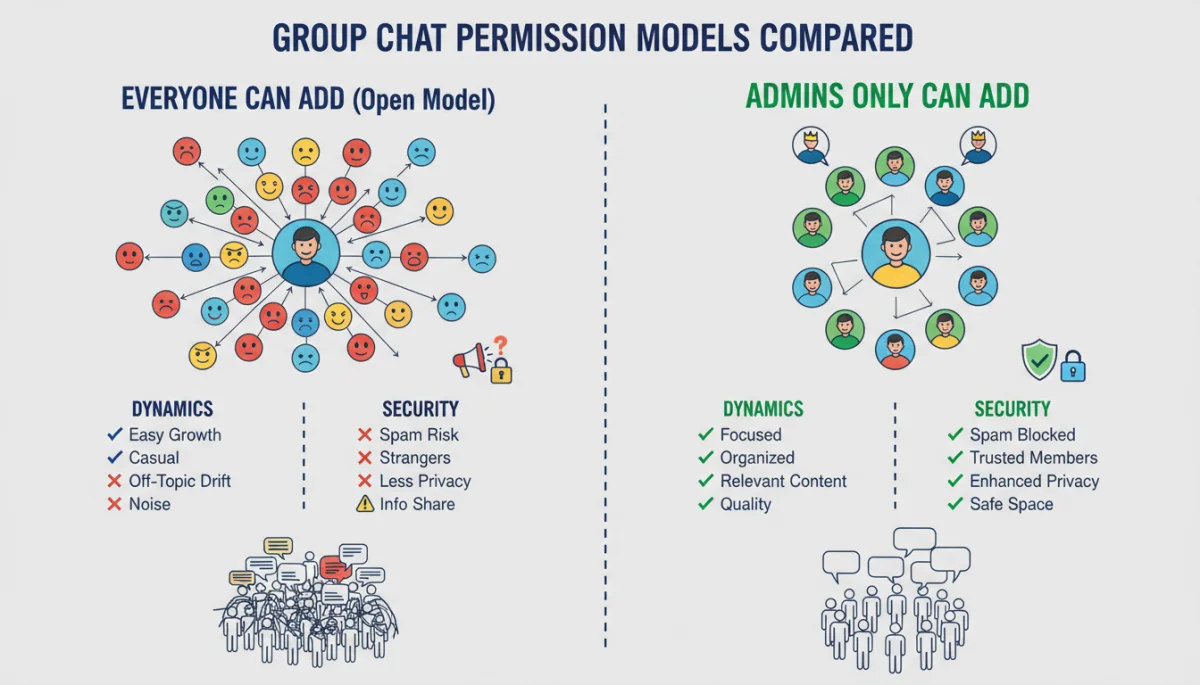
Many platforms, by default, allow any member of a group to add new participants. While this can facilitate organic growth and reduce the administrative burden, it also introduces potential risks. Unwanted members might be added, leading to spam, harassment, or the unintentional exposure of private conversations to outsiders. This open-door policy, while convenient, often sacrifices control for ease of use.
Conversely, restricting member additions to administrators only provides a much tighter grip on who enters the group. This approach is particularly beneficial for sensitive groups, professional environments, or communities where trust and relevance are paramount. It ensures that every new member is vetted, aligning with the group’s purpose and existing dynamics. However, it also places a greater responsibility on administrators to manage invitations promptly.
Platform-Specific Approaches to Member Addition
Each messaging app has its own nuanced way of handling member addition permissions. Understanding these differences is crucial for effective group management:
- WhatsApp: Group creators are automatically administrators. By default, all participants can add members. However, administrators can change this setting to ‘Only admins’ in the group settings, providing a layer of control.
- Telegram: Similar to WhatsApp, Telegram groups initially allow all members to add others. Administrators can adjust this in the ‘Permissions’ section of the group settings, choosing to restrict who can add new users.
- Signal: Signal prioritizes privacy. Group creators are admins, and they can choose to allow only admins to add new members or open it up to all members. This decision is made during group creation and can be modified later.
- Slack: In Slack, permissions are more granular. Workspace owners and admins typically control who can create channels and invite members. Within specific channels, channel managers or owners have the authority to add or remove members, depending on the workspace’s broader settings.
The choice between an open or restricted member addition policy should be a deliberate one, based on the group’s nature and objectives. For casual social groups, a more open policy might be acceptable. For professional teams or private communities, strict admin control is almost always preferable. This decision directly influences the group’s character and the quality of interactions within it.
Ultimately, the power to add members is a significant aspect of group chat permissions. Thoughtful consideration of this setting, coupled with an awareness of your chosen platform’s capabilities, will lead to a more secure and functional group chat experience for everyone involved.
Controlling Group Settings: Name, Icon, and Description
Beyond managing who can join, another critical aspect of group chat permissions involves controlling the group’s fundamental settings: its name, icon, and description. These elements are the public face of your group, conveying its purpose and identity to both current and prospective members. Uncontrolled modification of these settings can lead to confusion, misrepresentation, or even disruption within the group.
Imagine a professional project group chat suddenly having its name changed to something irrelevant or its icon replaced with an inappropriate image. Such incidents, while seemingly minor, can undermine the group’s credibility and hinder effective communication. This is why most messaging platforms provide robust controls to determine who has the authority to alter these core attributes.
Protecting Group Identity Through Permissions
The default setting on many platforms often allows any member to change the group name, icon, or description. While this can be convenient for collaborative groups where members are highly trusted, it poses a significant risk in larger or more diverse groups. Administrators typically have the option to restrict these modification rights, ensuring that only designated individuals can make such changes.
- Group Name: The name should clearly reflect the group’s purpose. Restricting who can change it prevents arbitrary modifications that might confuse members or mislead outsiders.
- Group Icon/Picture: The visual identity of the group. An inappropriate or irrelevant icon can quickly deter engagement or send the wrong message. Admin-only control ensures brand consistency or thematic relevance.
- Group Description: This often contains essential information about the group’s rules, objectives, or key contacts. Maintaining its accuracy and relevance is crucial, making admin control highly advisable.
Platforms like WhatsApp, Telegram, and Signal allow administrators to set permissions for editing group info, usually under a section labeled ‘Group settings’ or ‘Permissions.’ Slack, with its more structured environment, typically reserves such granular control for channel owners and workspace administrators, ensuring a consistent brand and operational standard across the organization.
The decision to restrict who can change these settings should be based on the group’s size, purpose, and the level of trust among its members. For highly formal or large groups, strict admin control is almost always the preferred option. For smaller, informal groups of close friends or family, a more open policy might be acceptable, assuming a high degree of mutual respect and understanding.
By carefully managing these group chat permissions, administrators can safeguard the group’s identity, prevent disruptive changes, and ensure that the group’s public face accurately represents its internal dynamics and objectives. This proactive approach contributes significantly to a more stable and professional group chat environment.
Advanced Permission Settings for Enhanced Control
As group chats evolve in complexity and purpose, basic permissions for adding members or changing names might not be sufficient. Many messaging platforms now offer advanced group chat permissions that provide a finer degree of control, allowing administrators to tailor the group environment to specific needs. These advanced settings are particularly valuable for large communities, official channels, or groups with a strict code of conduct.
These sophisticated options move beyond simple member management to encompass aspects like message sending rights, media sharing restrictions, and even the ability to pin important announcements. Leveraging these features can transform a chaotic open forum into a highly organized and efficient communication hub.
Exploring Granular Control Options
Advanced permissions allow administrators to dive deeper into how members interact within the group. This can be crucial for maintaining focus and preventing information overload or disruption.
- Sending Messages: Some platforms enable admins to restrict who can send messages. This is particularly useful for announcement-only channels, where only admins can post, or for moderated discussions where only approved speakers can contribute.
- Media Sharing: To prevent the spread of inappropriate content or to conserve bandwidth, admins can sometimes limit who can share photos, videos, or documents. This ensures that shared media is always relevant and approved.
- Pinning Messages: The ability to pin important messages to the top of the chat ensures that critical information, rules, or announcements are always visible to all members, regardless of how active the chat is. This is often an admin-only privilege.
- Creating Polls/Surveys: In some platforms, admins can control who can initiate polls or surveys, ensuring that such interactive features are used constructively and do not spam the chat.
- Adding Bots: For groups that integrate with automation tools, admins can manage who has the authority to add or remove bots, preventing unauthorized integrations that might compromise security or privacy.
These advanced settings are not universally available across all messaging apps, but leading platforms like Telegram, Slack, and even WhatsApp (to a lesser extent) have been continually adding more granular controls. For instance, Telegram’s ‘Supergroups’ offer extensive permission management, allowing admins to customize almost every aspect of member interaction, from message sending to media sharing and link previews.
The judicious use of advanced group chat permissions empowers administrators to create highly specialized and controlled environments. Whether it’s a classroom chat that needs to be announcement-only during lectures or a community group that requires strict moderation of shared content, these features provide the necessary tools to maintain order and achieve specific communication goals. Understanding and utilizing these options can significantly enhance the quality and effectiveness of any group chat.
Best Practices for Managing Group Chat Permissions
Effective management of group chat permissions goes beyond simply knowing what settings are available; it involves strategic implementation and ongoing vigilance. Establishing clear best practices ensures that your group chats remain secure, productive, and enjoyable for all participants. Poorly managed permissions can lead to a host of problems, from spam and irrelevant content to privacy breaches and member exodus.
Adopting a proactive approach to permission management can save administrators considerable time and effort in the long run. It sets clear expectations for members and defines the boundaries of interaction, fostering a healthier digital community.
Key Strategies for Optimal Permission Management
To maximize the benefits of group chat permissions, consider implementing the following strategies:
- Define Group Purpose Clearly: Before setting any permissions, clearly articulate the group’s objective. Is it for casual social interaction, professional collaboration, or critical announcements? The purpose will dictate the appropriate level of control.
- Appoint Trustworthy Administrators: Select administrators based on their reliability, judgment, and understanding of the group’s goals. Avoid appointing too many admins, as this can dilute responsibility and lead to inconsistent enforcement of rules.
- Start with Stricter Settings and Loosen if Necessary: For new groups, especially those with many members, it’s often safer to begin with stricter permissions (e.g., admin-only for adding members and changing info). You can always relax these settings later if the group proves to be self-regulating and trustworthy.
- Communicate Rules and Expectations: Clearly communicate the group’s rules and the rationale behind certain permission settings to all members. Transparency helps members understand and respect the boundaries, reducing the likelihood of issues.
- Regularly Review Permissions: Group dynamics can change over time. Periodically review your group chat permissions to ensure they still align with the group’s current needs and objectives. Adjust as necessary, especially if new features become available on your platform.
- Educate Members on Privacy: Remind members about the importance of privacy and the implications of adding new people without prior consent or vetting, even if the group allows it.
For example, in a large community group, you might restrict who can send messages to prevent spam, while in a small family chat, you might allow everyone to add members and change the group icon for a more collaborative feel. The context is everything.
By adhering to these best practices, administrators can create a structured yet flexible environment that caters to the group’s specific needs. Managing group chat permissions effectively is an ongoing process, but one that is crucial for maintaining order, fostering positive interactions, and ensuring the longevity of your digital communities.
The Impact of Permissions on Group Dynamics and Security
The way group chat permissions are configured has a profound and often underestimated impact on both the internal dynamics of a group and its overall security posture. These settings don’t just dictate who can do what; they shape the very culture of communication, influencing trust, engagement, and vulnerability to external threats. A well-managed permission structure can foster a sense of community and safety, while a lax approach can lead to disarray and potential risks.
Consider a scenario where anyone can add members without oversight. This might lead to an influx of spammers, bots, or individuals with malicious intent, disrupting conversations and potentially exposing personal information of existing members. Conversely, overly restrictive permissions might stifle organic interaction and make the group feel unwelcoming or overly controlled.
Balancing Control and Collaboration
The challenge lies in finding the right balance between maintaining control and encouraging collaboration. Strict permissions are vital for security and order, but they can sometimes hinder the spontaneous, community-driven aspects that make group chats appealing. Conversely, an open-door policy, while promoting ease of access, can quickly compromise privacy and lead to a loss of focus.
- Privacy Concerns: When anyone can add members, the privacy of existing members is at risk. Their phone numbers or usernames might be exposed to strangers without their consent. Restricting member addition to admins helps mitigate this.
- Spam and Disruption: Open invitation policies are a common vector for spammers and disruptive individuals. Admin control over who can send messages or add members acts as a critical barrier.
- Information Integrity: In groups where accurate information is paramount (e.g., official announcements, project updates), controlling who can change group info (name, description) or send messages ensures that only verified content is disseminated.
- Community Cohesion: The perception of security and order can significantly impact how members interact. A well-governed group fosters trust and encourages genuine engagement, while a chaotic one can lead to member disengagement or departure.
- Administrative Burden: While stricter permissions reduce risks, they also increase the administrative workload. Admins must be diligent in vetting new members and managing changes. This trade-off needs careful consideration.
Platforms often provide tools like invitation links with approval mechanisms, allowing a middle ground where members can invite others, but an admin still needs to approve their entry. This hybrid approach can offer both convenience and control.
The impact of group chat permissions extends far beyond technical settings; it touches upon the human element of digital interaction. By thoughtfully configuring these permissions, administrators can cultivate an environment that is both secure and conducive to positive, meaningful communication, ultimately enhancing the group’s overall health and longevity.
Platform-Specific Permission Customization: WhatsApp, Telegram, Signal, and Slack
While the general principles of group chat permissions remain consistent across platforms, the specific implementation and available customization options vary significantly between different messaging apps. Understanding these platform-specific nuances is crucial for administrators to effectively manage their groups and leverage the full potential of each application’s features. Each app has its own philosophy regarding user control and privacy, which is reflected in its permission settings.
Administrators often choose a messaging platform based on its overall features, but the granularity of its permission controls should also be a significant factor, especially for sensitive or large-scale groups. What works for a casual family chat on WhatsApp might be entirely inadequate for a professional team on Slack or a privacy-focused community on Signal.
Tailoring Permissions to Your Chosen Platform
Let’s delve into how popular messaging apps handle permissions for adding members and changing settings:
- WhatsApp: As one of the most widely used platforms, WhatsApp offers a foundational set of permissions. Group creators are automatically admins. Admins can control who can send messages (all participants or only admins) and who can edit group info (all participants or only admins). For adding members, the default is ‘all participants,’ but admins can change this to ‘only admins.’ This provides basic but effective control for most personal and small-to-medium-sized professional groups.
- Telegram: Telegram offers more robust and granular permission settings, especially for its ‘Supergroups.’ Admins can customize almost every action for non-admin members, including sending messages, sending media, sending stickers & GIFs, sending polls, adding members, pinning messages, and changing group info. This extensive control makes Telegram ideal for large communities, official channels, and highly moderated discussions.
- Signal: Prioritizing privacy and security, Signal’s group permissions are straightforward. The group creator is an admin, and they can choose to allow only admins to add new members or open it to all members. Additionally, admins can manage who can edit group info. While less complex than Telegram, Signal’s focus remains on secure communication with essential administrative controls.
- Slack: Designed primarily for workplace communication, Slack’s permission structure is integrated with workspace and channel roles. Workspace owners and administrators have overarching control over who can create channels, invite external guests, and manage broader workspace settings. Within specific channels, channel owners and managers can control who can post, archive the channel, or manage integrations. This hierarchical approach ensures that permissions align with organizational structures and security policies.
The key takeaway is that administrators should not assume that permission settings are universal. Each platform requires a specific understanding and configuration to optimize group functionality and security. Before creating a group, or if you’re managing an existing one, explore the ‘Group Settings’ or ‘Permissions’ menu of your chosen app to familiarize yourself with all available options.
By tailoring group chat permissions to the specific capabilities of WhatsApp, Telegram, Signal, or Slack, administrators can create environments that are perfectly aligned with their group’s purpose, ensuring efficient communication, enhanced privacy, and a positive user experience for everyone involved.
Future Trends in Group Chat Permission Management
The landscape of messaging apps is constantly evolving, and with it, the features related to group chat permissions are becoming more sophisticated. As digital communication becomes even more central to our lives, platforms are responding to user demands for greater control, enhanced privacy, and more intelligent automation in group management. Understanding these emerging trends can help administrators anticipate future tools and adapt their strategies accordingly.
The drive towards more nuanced permissions is fueled by the increasing complexity of online communities, the persistent threat of spam and misinformation, and the growing emphasis on user autonomy and data privacy. Future innovations will likely focus on making permission management both more powerful and easier to use.
Anticipating Evolution in Group Controls
Several key trends are shaping the future of group chat permission management:
- AI-Powered Moderation and Anomaly Detection: We can expect to see more AI integrated into permission management. AI could automatically detect and flag unusual activity, such as a sudden influx of new members from suspicious accounts or rapid changes to group settings, prompting admin review or even automatically reverting unauthorized changes.
- Role-Based Access Control (RBAC) Expansion: Beyond basic admin/member roles, platforms may offer more granular RBAC, allowing for custom roles with specific sets of permissions (e.g., a ‘content moderator’ who can delete messages but not add members, or a ‘community manager’ who can approve new members and pin messages). This is already prevalent in enterprise solutions like Slack but will likely trickle down to consumer apps.
- Decentralized Permissions and Blockchain Integration: For privacy-focused or Web3-native platforms, we might see experimentation with decentralized permission models, where control isn’t solely held by a single entity (the platform or even the group creator) but distributed among trusted members, potentially using blockchain for transparent and immutable record-keeping of permission changes.
- Enhanced Invitation and Approval Workflows: Expect more sophisticated invitation systems, such as temporary invitation links with expiry dates, multi-stage approval processes for new members, or even reputation-based entry systems, where a new member needs endorsements from existing, trusted members.
- Personalized Privacy Settings for Members: While admins control group-wide permissions, individual members might gain more control over how their presence is managed within groups. For example, options to hide their phone number from certain group members, or to automatically decline group invites from unknown contacts.
- Integrations with Identity Verification Services: To combat bots and fake accounts, future group chats, especially those for sensitive topics or professional networking, might integrate with third-party identity verification services to ensure that only real, verified individuals can join or gain specific permissions.
These trends suggest a future where group chat permissions are not just a static set of rules but a dynamic, intelligent system that adapts to the group’s needs and external threats. Administrators will have more powerful tools at their disposal, but also a greater responsibility to understand and configure these advanced options effectively.
Staying informed about these developments will be crucial for anyone managing online communities, ensuring that their group chats remain secure, engaging, and relevant in an ever-changing digital world.
| Key Point | Brief Description |
|---|---|
| Admin Control Over Members | Restricting who can add new members to administrators only enhances privacy and prevents unwanted participants like spammers. |
| Managing Group Identity | Permissions for changing group name, icon, and description are crucial for maintaining group relevance and preventing misrepresentation. |
| Advanced Controls | Granular settings for message sending, media sharing, and pinning messages offer finer control over group interaction. |
| Platform Variation | Permission options differ significantly across apps like WhatsApp, Telegram, Signal, and Slack, requiring platform-specific understanding. |
Frequently Asked Questions about Group Chat Permissions
Managing group chat permissions is crucial for maintaining privacy, preventing spam, and ensuring the group’s focus. It allows administrators to control who joins, who can post, and who can alter the group’s identity, thereby fostering a secure and productive communication environment for all members.
Advanced permissions go beyond basic member management, allowing administrators to control granular aspects like who can send messages, share media, pin messages, or create polls. These features are particularly useful for large communities or official channels that require strict moderation and content control.
Permissions vary significantly across platforms. WhatsApp offers essential controls, while Telegram provides extensive customization for ‘Supergroups.’ Signal focuses on privacy with core admin functions, and Slack integrates permissions with workspace and channel roles, reflecting their distinct use cases and priorities.
Best practices include clearly defining the group’s purpose, appointing trustworthy administrators, starting with stricter settings, communicating rules to members, and regularly reviewing permissions. This strategic approach ensures the group remains secure, productive, and aligned with its objectives.
Conclusion
Navigating the complexities of group chat permissions is an essential skill for anyone managing digital communities in today’s fast-paced world. From controlling who can add members to dictating who can change fundamental group settings, these permissions are the bedrock of a well-organized, secure, and productive communication environment. As messaging apps continue to evolve, offering increasingly sophisticated controls, the ability to effectively leverage these features will become even more critical. By understanding platform-specific nuances, implementing best practices, and staying informed about future trends, administrators can ensure their group chats remain vibrant, safe, and aligned with their intended purpose, fostering positive interactions and preventing common pitfalls.
