How to Update Communication Apps & Find Official Release Info

Ensuring you know how to update communication apps and find official release information is vital for maintaining digital security, accessing new functionalities, and optimizing your device’s performance.
In our increasingly connected world, communication apps are the lifelines that keep us in touch with family, friends, and colleagues. However, just like any other software, these applications require regular maintenance to function optimally and securely. Understanding how to update communication apps and find official release information is not merely a technical chore; it’s a critical aspect of digital hygiene that impacts your privacy, security, and overall user experience. This guide will walk you through the essential steps and best practices to ensure your digital conversations are always powered by the latest, most secure versions of your favorite apps.
Why Regular App Updates Are Crucial for Communication
Regularly updating your communication apps goes far beyond just getting new emojis or interface tweaks. These updates are fundamental for safeguarding your digital life and ensuring a seamless experience. Developers constantly work to improve their applications, and ignoring these updates can leave you vulnerable to a myriad of issues.
The primary reason for frequent updates is security. Cyber threats are evolving at an alarming rate, and app developers release patches to close vulnerabilities that hackers could exploit. Without these updates, your personal data, conversations, and even your device could be at risk. Beyond security, updates often introduce performance enhancements, bug fixes, and new features that enrich your communication experience.
The Security Imperative: Protecting Your Digital Conversations
Security vulnerabilities are a constant concern in the digital landscape. Each update often includes critical security patches designed to protect users from known exploits. Ignoring these patches is akin to leaving your front door unlocked in a bustling city.
- Patching Vulnerabilities: Updates frequently address newly discovered security flaws that could allow unauthorized access to your data.
- Preventing Data Breaches: Outdated apps are easier targets for malicious actors seeking to steal personal information or eavesdrop on communications.
- Malware Protection: Updates can also include improved defenses against malware and viruses that might target your communication channels.
Enhancing Performance and User Experience
Beyond security, updates bring tangible improvements to how your apps perform and how you interact with them. These enhancements can significantly impact your daily digital life, making communication smoother and more enjoyable.
From faster loading times to reduced battery consumption, performance improvements are a common benefit. Developers also refine the user interface, introduce quality-of-life features, and fix annoying bugs that might have hampered your experience. Staying updated means you’re always using the most stable and efficient version of the software.
In conclusion, treating app updates as optional is a significant oversight. For communication apps, where personal and sensitive information is frequently exchanged, keeping them updated is not just recommended but absolutely essential for security, functionality, and an optimal user experience. It’s a simple habit that yields substantial benefits in the long run.
Automatic vs. Manual Updates: Understanding Your Options
When it comes to updating your communication apps, you generally have two main approaches: automatic or manual. Both methods have their advantages and disadvantages, and understanding them helps you make an informed decision about how to manage your app maintenance effectively.
Automatic updates offer convenience and ensure you’re always running the latest version without active intervention. Manual updates, on the other hand, provide more control over when and how updates are installed, which can be beneficial for specific scenarios. Choosing the right method depends on your personal preferences, data plan, and device usage.
Setting Up Automatic Updates for Seamless Security
For most users, automatic updates are the recommended default. They ensure that security patches and new features are installed as soon as they become available, minimizing your exposure to vulnerabilities and keeping your apps running smoothly without any effort on your part.
- Android Devices: Open the Google Play Store, tap your profile icon, go to Settings > Network preferences > Auto-update apps. You can choose to auto-update over Wi-Fi only or over any network.
- iOS Devices: Go to Settings > App Store. Under ‘Automatic Downloads,’ toggle ‘App Updates’ on. You can also choose whether to use cellular data for automatic downloads.
- Desktop Applications: Many desktop communication apps, like Slack or Discord, have built-in auto-update features that can be configured within their respective settings menus.
When Manual Updates Offer Greater Control
While automatic updates are convenient, there are situations where manual updates might be preferred. This could be due to limited data plans, concerns about app stability after a major update, or wanting to review new features before installation.
Manual updates give you the power to choose when to download and install new versions. This means you can wait for reviews of a new update to ensure it’s stable and doesn’t introduce unwanted bugs before committing to it. It also allows you to schedule updates for times when your device is idle or connected to a stable Wi-Fi network, avoiding potential interruptions or data overages.
Ultimately, the choice between automatic and manual updates depends on your comfort level and specific needs. For optimal security and ease of use, automatic updates are often the best choice. However, if you prefer more control or have specific technical considerations, manual updates provide the flexibility you need. Always remember that regardless of the method, keeping your apps updated is paramount.
Navigating App Stores: Your First Stop for Official Information
When you need to know how to update communication apps or find official release information, the primary app stores – Google Play Store for Android and Apple App Store for iOS – are your most reliable and direct sources. These platforms serve as central hubs for app distribution and provide essential details directly from the developers.
Understanding how to effectively navigate these stores can save you time and ensure you’re always getting legitimate information and updates. They are designed to be user-friendly, offering a wealth of data ranging from version numbers to developer contact information and privacy policies.

Finding Update Information in Google Play Store
For Android users, the Google Play Store is the gateway to all app-related information. It’s not just for downloading new apps; it’s also where you manage existing ones, including checking for updates and reviewing release notes.
To check for updates, open the Play Store, tap your profile icon, then select ‘Manage apps & device.’ Here, you’ll see a section for ‘Updates available.’ Tapping ‘See details’ will show you which apps have pending updates. For specific app information, search for the app, go to its page, and scroll down to the ‘About this app’ section. This usually contains the latest version number, release date, and a ‘What’s new’ section detailing changes.
Accessing Release Details in Apple App Store
iOS users will find similar functionalities within the Apple App Store. Apple’s platform is equally robust in providing comprehensive details about applications, ensuring transparency and ease of access to update information.
To check for updates, open the App Store, tap your profile picture at the top right, and scroll down to see pending updates or recently updated apps. To find detailed release information for a specific app, search for it, tap on its icon, and then scroll down to the ‘Version History’ section. This area provides a chronological list of updates with release notes, dates, and version numbers, offering a clear overview of the app’s evolution.
By regularly checking these official app stores, you can confidently manage your communication app updates and stay informed about new features, security enhancements, and bug fixes directly from the source. This proactive approach ensures you’re always using the most current and secure versions of your essential communication tools.
Official Developer Websites and Blogs: Deeper Insights
While app stores provide essential update information, for a deeper dive into release details, future roadmaps, and comprehensive security advisories, official developer websites and blogs are invaluable resources. These platforms are where developers communicate directly with their user base, offering insights that might not be available elsewhere.
Visiting these official sources is particularly useful for understanding significant changes, privacy policy updates, or detailed explanations of new features. They often contain FAQs, support forums, and direct contact information, making them crucial for advanced users or anyone seeking thorough information about their communication apps.
Exploring Developer Websites for Comprehensive Information
Most reputable communication apps maintain dedicated websites that serve as a central hub for all things related to their product. These sites are often meticulously designed to provide users with all the necessary information.
- Release Notes Archives: Websites often host archives of all past release notes, allowing you to track the app’s development over time.
- Security Bulletins: For critical security updates, developers may publish detailed bulletins explaining the vulnerability and the patch implemented.
- Feature Roadmaps: Some developers share their future plans and upcoming features, giving users a glimpse into what’s next.
Leveraging Developer Blogs for Latest News and Updates
Developer blogs are another excellent resource for staying informed. These blogs often provide a more narrative and in-depth look at updates, explaining the ‘why’ behind certain changes and offering tips on how to use new features effectively.
Blogs can be a great place to find announcements about major version releases, beta programs, and even company news that might impact the app’s future development. Subscribing to RSS feeds or email newsletters from these blogs can ensure you receive timely notifications about important updates directly in your inbox, bypassing the need to constantly check for new information manually.
In summary, while app stores are convenient for initiating updates, official developer websites and blogs are indispensable for gaining a comprehensive understanding of your communication apps. They offer transparency, detailed information, and a direct line to the creators, empowering you to make informed decisions about your app usage and maintenance.
Understanding Release Notes and Version Numbers
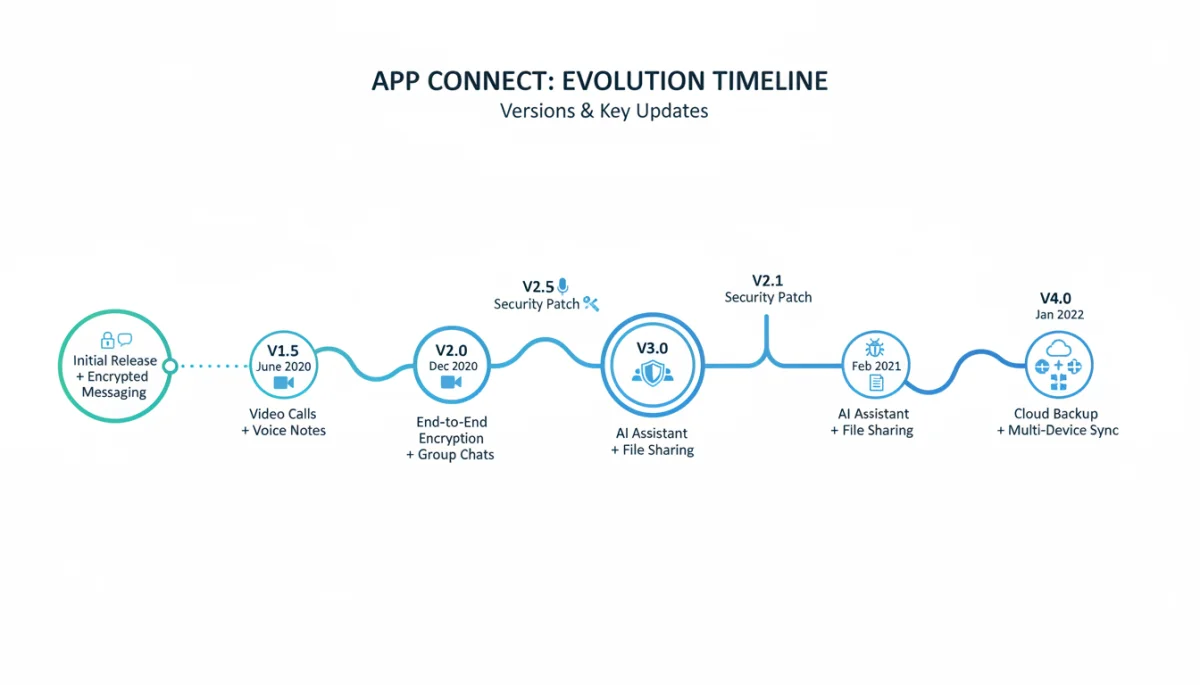
To truly master how to update communication apps and stay informed, it’s essential to understand what release notes and version numbers signify. These seemingly small details contain a wealth of information about an app’s evolution, stability, and security. Neglecting them means missing out on critical insights into the software you rely on daily.
Release notes are the developer’s direct communication to users about what’s new, fixed, or improved in a specific version. Version numbers, on the other hand, provide a structured way to track these changes, indicating the scope and significance of each update.
Deciphering Release Notes: What to Look For
Release notes can sometimes be brief, while other times they are extensive. Knowing what to prioritize when reading them can help you quickly grasp the impact of an update.
Always look for mentions of ‘security fixes,’ ‘bug fixes,’ and ‘performance improvements.’ These indicate critical updates that enhance stability and protection. New features are also important, but security and stability should always take precedence. Pay attention to any warnings about deprecated features or changes that might require you to adjust your usage habits. A well-written release note will clearly articulate these points, often with bullet points or categorized sections for easy readability.
The Significance of Version Numbers
Version numbers typically follow a pattern like X.Y.Z, where each number signifies a different level of change. Understanding this convention helps you gauge the importance of an update.
- Major Version (X): A change in the first number (e.g., 1.0 to 2.0) usually indicates a significant overhaul, new architecture, or a large set of new features that might even break compatibility with older versions.
- Minor Version (Y): A change in the second number (e.g., 1.1 to 1.2) typically signifies new features, major enhancements, or a substantial collection of bug fixes without breaking backward compatibility.
- Patch Version (Z): A change in the third number (e.g., 1.1.1 to 1.1.2) usually denotes minor bug fixes, small performance improvements, or critical security patches. These are often the most frequent updates.
By paying attention to both release notes and version numbers, you gain a clearer picture of an update’s scope and importance. This knowledge empowers you to make informed decisions about when to update, especially if you’re managing multiple devices or have specific concerns about app stability. It transforms the act of updating from a passive acceptance to an active, informed choice.
Troubleshooting Update Issues and Common Pitfalls
Even with the best intentions to keep your apps updated, you might occasionally encounter issues. Understanding common update problems and how to troubleshoot them is an essential part of effectively managing your communication apps. Being prepared for these scenarios can save you frustration and ensure your apps remain functional.
From insufficient storage to network connectivity problems, various factors can impede a smooth update process. Knowing the typical culprits and their solutions will help you quickly resolve most common update-related hiccups, getting you back to seamless communication.
Common Reasons Why Apps Fail to Update
Several factors can prevent an app from updating correctly. Identifying the root cause is the first step towards a solution. Often, the problem is simpler than it seems.
- Insufficient Storage: The most common reason. Apps require free space to download and install updates.
- Unstable Internet Connection: A weak or intermittent Wi-Fi or cellular connection can interrupt downloads.
- App Store Cache Issues: Corrupted cache data in your device’s app store can prevent updates.
- Developer-Side Problems: Occasionally, the issue might be with the app developer’s servers or a temporarily pulled update.
Practical Solutions for Update Problems
Fortunately, most update issues can be resolved with a few straightforward troubleshooting steps. These solutions are generally safe and don’t require advanced technical knowledge.
- Check Storage Space: Delete unnecessary files, clear app caches, or offload unused apps to free up space.
- Verify Internet Connection: Switch to a stable Wi-Fi network or troubleshoot your cellular data connection.
- Restart Your Device: A simple restart can often clear temporary glitches and refresh system processes.
- Clear App Store Cache: For Android, go to Settings > Apps > Google Play Store > Storage > Clear Cache. For iOS, offloading and reinstalling the App Store isn’t an option, but signing out and back into your Apple ID can sometimes help.
- Manually Update: If automatic updates fail, try initiating the update manually through the app store.
- Contact Support: If all else fails, reach out to the app developer’s support team or your device manufacturer for assistance.
By familiarizing yourself with these common problems and their solutions, you can proactively address update issues and minimize downtime. Staying vigilant and knowing how to troubleshoot will ensure your communication apps remain reliable and up-to-date, providing a consistent and secure communication experience.
Beyond the Basics: Beta Programs and Early Access
For those who want to be at the forefront of app development and contribute to the improvement of communication tools, beta programs and early access initiatives offer a unique opportunity. These programs allow users to test pre-release versions of apps, providing feedback directly to developers before new features or updates are rolled out to the general public.
Participating in a beta program is a more advanced way to engage with the question of how to update communication apps. It’s not just about receiving updates, but actively shaping them. While it comes with potential risks, the benefits for enthusiastic users and developers alike can be significant.
What Are Beta Programs and How Do They Work?
Beta programs are essentially testing phases for software. Developers release unfinished versions of their apps to a select group of users to identify bugs, gather feedback on new features, and assess performance in real-world scenarios. This feedback loop is crucial for refining the app before its official launch.
- Access to New Features: Beta testers get to experience upcoming features and design changes before anyone else.
- Direct Developer Interaction: Participants often have direct channels to report bugs and suggest improvements.
- Identifying Issues Early: Your testing helps developers catch and fix problems that might otherwise impact millions of users.
Joining Beta Programs for Communication Apps
Joining a beta program typically involves signing up through the developer’s website or through specific platforms provided by Google (for Android) and Apple (for iOS). It’s important to understand the implications before joining.
For Android, many apps offer beta programs directly through the Google Play Store on the app’s listing page. For iOS, Apple’s TestFlight app is commonly used for beta testing. While participating, remember that beta versions can be unstable, may contain bugs, and could potentially lead to data loss. Always back up important data and consider using a secondary device for beta testing if possible. Your feedback is invaluable, but be prepared for a less polished experience than the stable public release.
Engaging with beta programs offers a deeper level of involvement in the development of your favorite communication apps. It’s a way to influence the future of these tools and ensure they meet user needs more effectively. However, approach beta testing with a clear understanding of its experimental nature and the potential for encountering issues.
| Key Aspect | Brief Description |
|---|---|
| Update Necessity | Crucial for security patches, bug fixes, performance, and new features. |
| Official Sources | App stores (Google Play, Apple App Store) and developer websites/blogs are primary. |
| Release Notes | Detail changes, fixes, and new features in each app version. |
| Troubleshooting | Common issues include storage, network, and cache; solutions are often simple restarts or clearing data. |
Frequently Asked Questions About App Updates
Communication apps require frequent updates to address evolving security threats, fix bugs, improve performance, and introduce new features that enhance user experience. The dynamic nature of digital communication necessitates constant development and refinement to stay secure and competitive.
Yes, it is generally safe to update apps over cellular data. However, be mindful of your data plan, as large updates can consume a significant amount of data, potentially leading to overage charges. It’s often recommended to update over Wi-Fi when possible to avoid this.
Always download updates directly from official sources like the Google Play Store or Apple App Store. Check the developer’s name and read release notes. Be wary of update notifications from unofficial websites or unexpected pop-ups, which could be phishing attempts or malware.
If an update causes issues, first try restarting your device. If the problem persists, check the app’s reviews in the app store for similar complaints or visit the developer’s official support page. Sometimes, uninstalling and reinstalling the app (after backing up data) can resolve issues.
Reverting to an older version of an app is generally not recommended and often difficult, especially on iOS. On Android, it might be possible via APK files from third-party sites, but this carries significant security risks. It’s best to stick with the latest official version for security and compatibility.
Conclusion
Mastering how to update communication apps and efficiently finding official release information is more than just a technical skill; it’s a fundamental aspect of maintaining a secure, efficient, and enjoyable digital life. From safeguarding your personal data against ever-evolving cyber threats to unlocking new features and performance enhancements, regular updates are the bedrock of a reliable communication experience. By leveraging official app stores, diving into developer websites and blogs, and understanding the nuances of release notes, you empower yourself to make informed decisions about your digital tools. While troubleshooting update issues might occasionally arise, the solutions are often straightforward, ensuring minimal disruption. Furthermore, for the truly engaged, beta programs offer a unique opportunity to contribute to the future of these essential applications. In a world increasingly reliant on digital connections, staying updated isn’t just a recommendation; it’s a necessity for secure, seamless, and cutting-edge communication.
