What to Do If You Suspect Someone Accessed Your Messaging Account
If you suspect someone has accessed your messaging account, immediate action is crucial to protect your personal information and digital privacy, requiring prompt identification, security measures, and recovery protocols.
Have you ever had that unsettling feeling? A strange message sent from your account, an unfamiliar login alert, or simply a gut instinct that something isn’t right. Discovering that someone might have accessed your messaging account can be a genuinely alarming experience, leaving you feeling exposed and vulnerable. This guide will walk you through the essential steps to take when you messaging account compromise is suspected, helping you regain control and fortify your digital defenses.
Immediate Action: Confirming and Containing the Breach
When you first suspect unauthorized access to your messaging account, panic can set in quickly. However, a calm and methodical approach is your best defense. The initial steps involve confirming whether a breach has actually occurred and then taking immediate measures to contain any further damage. Acting swiftly can significantly limit the impact on your privacy and data security.
Signs of Unauthorized Access
Before jumping to conclusions, it’s important to recognize common indicators that your messaging account might be compromised. These signs can range from subtle anomalies to overt changes, all pointing towards someone else having gained access to your digital communications.
- Unfamiliar messages sent from your account to contacts.
- Login notifications from unrecognized devices or locations.
- Changes to your profile picture, status, or other personal information.
- Inability to log in due to changed password, despite entering it correctly.
If you observe any of these signs, it’s highly probable that your account has been breached. Trust your instincts; if something feels off, it likely is. Documenting these observations can be helpful later if you need to report the incident.
Changing Passwords and Enabling MFA
The absolute first step in containing a potential breach is to change your password. Create a new, strong, and unique password that you haven’t used anywhere else. A strong password typically includes a mix of uppercase and lowercase letters, numbers, and symbols, and is at least 12-16 characters long. Immediately after changing your password, enable Multi-Factor Authentication (MFA) if you haven’t already. MFA adds an extra layer of security, usually requiring a code from your phone or a biometric scan, making it significantly harder for unauthorized users to access your account even if they have your password.
The importance of MFA cannot be overstated. It acts as a critical barrier, ensuring that even if a malicious actor acquires your password, they still cannot gain entry without the second factor. This simple step can prevent a vast majority of account takeovers. Make sure to review your account’s security settings for any unusual activity or linked devices you don’t recognize.
Confirming and containing a breach requires vigilance and quick action. By identifying the signs and immediately securing your account with a new, strong password and MFA, you lay the groundwork for a successful recovery and prevent further unauthorized access to your sensitive conversations.
Securing Your Devices and Other Accounts
A compromised messaging account often serves as a gateway to other aspects of your digital life. If an attacker gained access to your messaging, they might also attempt to access linked email accounts, social media profiles, or even financial services. Therefore, securing your messaging account is just the first step; you must extend your security measures across all your devices and other online accounts to prevent a cascading security failure.
Scanning for Malware and Viruses
Unauthorized access to your messaging account could be a symptom of a deeper problem: malware on your device. Malware, such as spyware or keyloggers, can record your keystrokes, steal your passwords, and provide remote access to your device. Running a thorough scan with reputable antivirus and anti-malware software on all your devices (computers, smartphones, tablets) is crucial. Ensure your security software is up to date before initiating the scan.
If any threats are detected, follow the software’s instructions to quarantine and remove them. It’s also advisable to change all your passwords again after cleaning your devices, as the malware might have captured your new credentials before removal. Regularly updating your operating system and applications helps patch security vulnerabilities that attackers exploit.
Reviewing Linked Accounts and Permissions
Many messaging apps allow linking to other services or granting permissions to third-party applications. If your messaging account was compromised, an attacker could potentially exploit these connections to gain access to other parts of your digital identity. It’s imperative to review all linked accounts and permissions within your messaging app’s security settings.
Carefully examine the list of authorized applications and revoke access for any that you don’t recognize or no longer use. This includes apps that claim to offer extra features for your messaging service, as some can be malicious. Also, check your email accounts for unusual login attempts or password reset requests, as email is often the recovery mechanism for other services. Securing these interconnected accounts is paramount to comprehensive digital safety.

By scanning your devices for malware and meticulously reviewing linked accounts and permissions, you can effectively close off potential avenues for attackers to exploit. This holistic approach ensures that a breach in one area doesn’t lead to widespread compromise across your entire digital footprint, reinforcing your overall cybersecurity posture.
Notifying Contacts and Reporting the Incident
Once you’ve secured your own accounts and devices, the next critical step is to consider the impact on your contacts. A compromised messaging account can be used to spread spam, phishing attempts, or even malware to your friends, family, and colleagues. Additionally, reporting the incident to the messaging service provider and relevant authorities is essential for both your safety and the broader online community.
Warning Your Contacts
Attackers often leverage compromised messaging accounts to impersonate the legitimate user and trick their contacts into revealing personal information or clicking malicious links. It’s crucial to inform your contacts as soon as possible that your account may have been compromised. Use an alternative, secure communication method, such as email, a different messaging app, or a phone call, to send out a warning.
In your message, clearly state that your messaging account was accessed without authorization and that they should be wary of any suspicious messages or links coming from your compromised account. Advise them not to click on any links or respond to unusual requests. This proactive communication helps protect your network from potential scams and demonstrates responsible digital citizenship.
Reporting to the Messaging Service
Every reputable messaging service has a mechanism for reporting security incidents, including unauthorized access. Reporting the breach to the service provider is vital for several reasons. It allows them to investigate the incident, potentially identify the source of the attack, and implement measures to prevent similar occurrences for other users. It also serves as an official record of the compromise, which might be useful if further issues arise.
- Locate the “Help” or “Support” section within the messaging app or website.
- Look for options related to “Account Security,” “Unauthorized Access,” or “Report a Compromise.”
- Provide as much detail as possible, including when you first noticed the issue, any suspicious activities, and the steps you’ve already taken.
- Follow any instructions provided by the service for account recovery or further investigation.
Reporting the incident also helps the service provider track trends in cyberattacks, contributing to better overall security for all users. Be prepared to provide evidence if requested, such as screenshots of suspicious activity or login alerts.
Notifying your contacts and reporting the incident to the messaging service are indispensable steps in managing a compromised account. These actions not only protect your immediate network but also contribute to a safer online environment for everyone, demonstrating a commitment to collective security.
Data Recovery and Privacy Restoration
After containing the breach and notifying relevant parties, the focus shifts to recovering any potentially lost or altered data and restoring your privacy settings. A thorough review of your account’s history and privacy configurations is essential to ensure that no lasting damage has been done and that your communications remain secure going forward.
Checking for Data Tampering
Attackers may not just send messages from your account; they might also delete conversations, modify profile information, or even access stored media. Carefully review your messaging history, sent items, and profile settings for any unauthorized changes. Look for deleted chats, altered contact information, or changes to your status or ‘about’ section. If the messaging app allows, check the login history for any unfamiliar IP addresses or device types.
If you discover any data tampering, try to restore it if the messaging service offers such a feature (e.g., through backups). Documenting these changes is important for your records and any ongoing investigation. This detailed review ensures you understand the full extent of the breach and can take appropriate steps to revert any malicious alterations.
Restoring Privacy Settings
A compromised account is an opportune moment for an attacker to weaken your privacy settings, making it easier for them or others to access your information in the future. After securing your account, go through all your privacy settings with a fine-tooth comb. Ensure that only trusted contacts can see your online status, profile picture, or ‘last seen’ information.
Review who can add you to groups, send you messages, or view your stories. Adjust these settings to your preferred level of privacy. Consider making your profile more private, at least temporarily, until you are fully confident that your account is secure. This proactive measure prevents future unauthorized surveillance or contact and reestablishes your personal boundaries in the digital space.
By diligently checking for data tampering and meticulously restoring your privacy settings, you can effectively mitigate the long-term impact of a messaging account compromise. These actions are crucial for regaining full control over your digital identity and ensuring your personal information remains confidential.
Preventative Measures for Future Security
Experiencing a messaging account compromise is a wake-up call for improving your digital security habits. While it’s impossible to eliminate all risks, adopting robust preventative measures can significantly reduce the likelihood of future breaches. Proactive security is always more effective than reactive damage control.
Strong Password Practices
The foundation of good digital security lies in strong, unique passwords. Never reuse passwords across different accounts. Use a combination of uppercase and lowercase letters, numbers, and symbols. Aim for passwords that are at least 12-16 characters long. Instead of trying to memorize complex passwords, consider using a reputable password manager. These tools can generate and securely store strong, unique passwords for all your accounts, requiring you to remember only one master password.
Regularly updating your passwords, even without a suspected breach, is also a good practice. Treat your passwords like physical keys to your home; you wouldn’t use the same key for every door, nor would you leave them exposed. Embracing strong password practices is the simplest yet most impactful step you can take to bolster your online security.
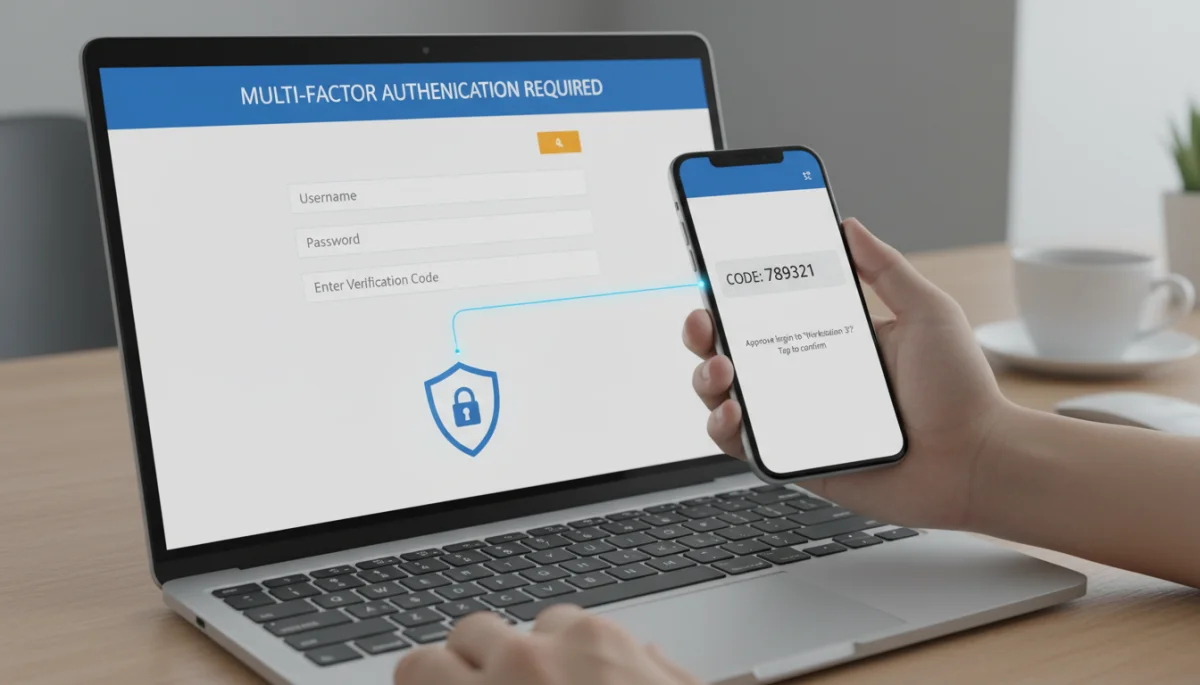
Implementing Multi-Factor Authentication (MFA) Everywhere
Multi-Factor Authentication (MFA) adds an essential layer of security beyond just a password. It requires you to provide two or more verification factors to gain access to an account, such as something you know (password), something you have (phone, security key), or something you are (fingerprint, facial recognition). Most messaging apps and other online services now offer MFA, and enabling it should be a top priority for every account.
Even if an attacker manages to steal your password, they will be blocked by the second factor, preventing them from accessing your account. Choose the strongest MFA options available, such as authenticator apps or hardware security keys, over SMS-based codes, which can sometimes be vulnerable to SIM-swapping attacks. Make MFA a non-negotiable security standard for all your critical online accounts.
Staying Informed on Phishing and Scams
Many account compromises originate from social engineering tactics, particularly phishing and various online scams. Attackers often send deceptive messages or emails designed to trick you into revealing your login credentials or installing malware. Always be suspicious of unsolicited messages, especially those asking for personal information, promising unrealistic rewards, or creating a sense of urgency.
- Verify the sender’s identity before clicking on links or downloading attachments.
- Hover over links to see the actual URL before clicking (don’t trust display text).
- Be wary of grammatical errors or unusual phrasing in messages.
- Never share your passwords or MFA codes with anyone, even if they claim to be from support.
Educating yourself about common phishing techniques and staying updated on new scam trends is vital. A healthy dose of skepticism can save you from becoming the next victim of a cyberattack. Always double-check requests for sensitive information through an alternative, verified channel.
By adopting strong password practices, implementing MFA across all accounts, and remaining vigilant against phishing and scams, you can significantly enhance your digital resilience. These preventative measures create a robust defense against unauthorized access, safeguarding your messaging accounts and broader digital life.
Legal and Financial Implications
While the immediate concern after a messaging account compromise is often about privacy and data, it’s crucial not to overlook the potential legal and financial ramifications. Depending on the nature of the information exchanged through your messaging app, a breach could lead to identity theft, financial fraud, or even legal liabilities. Understanding these potential consequences helps in taking appropriate protective actions.
Monitoring for Identity Theft
If personal identifiers, such as your full name, address, phone number, or even financial details, were shared via your messaging account, you could be at risk of identity theft. Attackers can use this information to open new credit accounts, file fraudulent tax returns, or access existing financial services in your name. It’s imperative to monitor your financial accounts and credit reports closely for any suspicious activity.
Consider placing a fraud alert or freezing your credit with the major credit bureaus (Equifax, Experian, TransUnion). Regularly review bank statements, credit card bills, and any unfamiliar correspondence for signs of identity theft. Reporting any fraudulent activity immediately to your bank and relevant authorities is crucial to mitigate financial losses and restore your credit standing. Proactive monitoring can catch issues before they escalate.
Understanding Legal Recourse
Depending on the jurisdiction and the severity of the breach, you might have legal recourse against the individuals responsible for compromising your account or, in some cases, against service providers if negligence can be proven. While pursuing legal action can be complex, understanding your rights and options is important. If the breach involved sensitive information or led to significant harm, consulting with a legal professional specializing in cyber law might be advisable.
Additionally, reporting the incident to law enforcement agencies, such as the FBI’s Internet Crime Complaint Center (IC3) in the U.S., can help in the broader fight against cybercrime. While they may not be able to recover your specific losses, your report contributes to intelligence that can lead to arrests and prevention of future crimes. Documenting all aspects of the breach, including communications with the messaging service and financial institutions, is vital for any legal proceedings.
The legal and financial implications of a messaging account compromise can be far-reaching. By actively monitoring for identity theft and understanding your potential legal recourse, you can protect yourself from further harm and seek justice if necessary. These steps ensure a comprehensive response to the multifaceted challenges posed by a security breach.
| Key Action | Brief Description |
|---|---|
| Secure Account Immediately | Change passwords and enable Multi-Factor Authentication (MFA) to lock out unauthorized users. |
| Scan Devices | Check all devices for malware or viruses that might have facilitated the breach. |
| Notify Contacts & Service | Alert your contacts to potential malicious messages and report the incident to the messaging provider. |
| Monitor & Prevent | Monitor financial accounts for fraud and adopt strong passwords and MFA for future protection. |
Frequently Asked Questions About Messaging Account Compromise
Look for unusual activity such as messages you didn’t send, login alerts from unknown locations or devices, or changes to your profile. If friends report receiving strange messages from you, that’s a strong indicator.
Immediately change your password to a strong, unique one that you haven’t used before. Then, enable Multi-Factor Authentication (MFA) on your account if it’s not already active to add an extra layer of security.
Yes, it’s crucial to inform your contacts via an alternative, secure method. This warns them not to click on suspicious links or respond to unusual requests coming from your potentially compromised account, protecting them from scams.
Use strong, unique passwords for all accounts, enable MFA everywhere, and be vigilant against phishing attempts. Regularly update software and avoid clicking on suspicious links or downloading unknown attachments.
Consequences can range from privacy invasion and data loss to identity theft and financial fraud if sensitive information was exposed. Attackers might also use your account to spread malware or phishing scams to your contacts.
Conclusion
A suspected messaging account compromise is a serious digital security event that demands immediate and comprehensive action. By following the steps outlined in this guide—from confirming and containing the breach to securing all your devices, notifying your contacts, and implementing robust preventative measures—you can effectively mitigate risks and restore your digital peace of mind. Proactive vigilance, strong password practices, and the widespread adoption of Multi-Factor Authentication are not just recommendations but essential safeguards in today’s interconnected world. Taking these steps not only protects your personal information but also contributes to a safer online environment for everyone.
