Manage Linked Devices: WhatsApp & Signal Security Guide
Effectively managing linked devices in WhatsApp and Signal is crucial for maintaining digital privacy and security, providing users with control over where their encrypted communications are accessed and ensuring unauthorized access is prevented.
In today’s interconnected digital landscape, understanding how to manage linked devices in WhatsApp and Signal is not just a convenience, but a fundamental aspect of safeguarding your personal communications. These popular messaging platforms offer seamless continuity across multiple devices, yet this convenience comes with the responsibility of actively managing those connections to prevent unauthorized access and maintain privacy.
understanding linked devices in modern messaging
The concept of linked devices has revolutionized how we interact with messaging applications. It allows users to access their conversations from various platforms—smartphones, tablets, and desktop computers—without needing their primary device constantly connected to the internet. This section delves into the foundational aspects of linked device functionality in WhatsApp and Signal, highlighting their unique approaches to security and user experience.
Both WhatsApp and Signal have evolved their multi-device capabilities significantly. Initially, WhatsApp required the primary phone to be online and connected to the internet for its web or desktop client to function. Signal, from its inception, offered a more independent multi-device experience. Understanding these differences is key to appreciating the security implications of each platform’s design.
how multi-device works
- WhatsApp’s Multi-Device 2.0: Now allows up to four linked devices to send and receive messages without the primary phone being online. Each linked device connects independently to WhatsApp servers, maintaining end-to-end encryption.
- Signal’s Linked Devices: Signal’s desktop and iPad apps function as independent clients, each maintaining its own secure session with the Signal server. This means messages are encrypted for each specific device.
- Encryption Across Devices: Both platforms ensure that end-to-end encryption is preserved across all linked devices, meaning only the sender and intended recipient(s) can read the messages.
The core benefit of linked devices is uninterrupted communication. Whether your phone battery dies or you prefer typing on a larger keyboard, your conversations remain accessible. However, this accessibility necessitates a clear understanding of how to manage these connections effectively to prevent potential security vulnerabilities. Regularly reviewing linked devices is a crucial step in maintaining control over your digital footprint.
securing your whatsapp linked devices
WhatsApp, with its vast user base, has made significant strides in improving its multi-device experience while prioritizing security. Managing your linked devices in WhatsApp is straightforward but requires diligence to ensure no unauthorized access occurs. This section provides a step-by-step guide on how to review, add, and remove devices from your WhatsApp account, emphasizing best practices for enhanced security.
The process of linking a new device typically involves scanning a QR code from your primary smartphone. While convenient, this also means anyone with temporary physical access to your unlocked phone could potentially link a new device without your immediate knowledge. Therefore, regular checks are indispensable.
checking and unlinking devices
To view and manage your linked devices in WhatsApp:
- Open WhatsApp: On your primary smartphone, open the WhatsApp application.
- Navigate to Settings: For Android, tap the three vertical dots (More options) and select ‘Linked Devices.’ For iOS, go to ‘Settings’ at the bottom right and then ‘Linked Devices.’
- Review Active Sessions: You will see a list of all currently linked devices, including their last active time and device type (e.g., WhatsApp Web, WhatsApp Desktop).
- Log Out of Unknown Devices: Tap on any device you don’t recognize or no longer use. Select ‘Log Out’ to immediately terminate its access to your WhatsApp account.
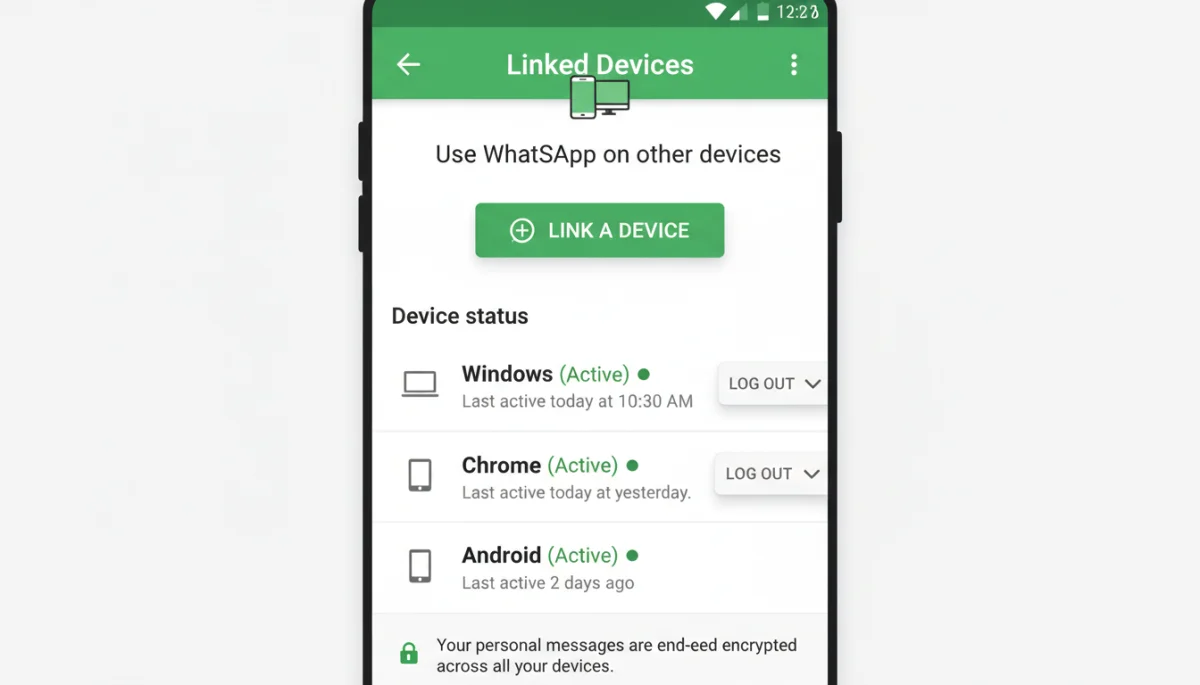
It’s a good habit to perform this check periodically, especially if you’ve used WhatsApp on a public computer or a shared device. Unlinking a device ensures that it can no longer send or receive messages from your account, providing an immediate security measure against potential compromises. This proactive approach is a cornerstone of effective manage linked devices practices.
managing your signal linked devices
Signal is renowned for its strong emphasis on privacy and end-to-end encryption, and its approach to linked devices reflects this commitment. While similar in concept to WhatsApp, Signal’s multi-device architecture offers distinct advantages in terms of independence and privacy. This section outlines the process for managing your linked devices within Signal, focusing on how to maintain the highest level of security.
Unlike WhatsApp’s original model, Signal’s linked devices operate more autonomously. Each linked device generates its own encryption keys, contributing to a more robust security posture. This design minimizes the risk associated with a single point of failure, such as the primary phone being compromised.
adding and removing signal devices
- On your Primary Phone: Open Signal, go to ‘Settings’ (profile icon in the top left), then select ‘Linked Devices.’
- To Link a New Device: Tap ‘Link New Device’ and use your phone to scan the QR code displayed on the Signal desktop or iPad app you wish to link.
- To Unlink a Device: In the ‘Linked Devices’ list, tap on the device you want to remove. Confirm by selecting ‘Unlink’ or ‘Remove.’
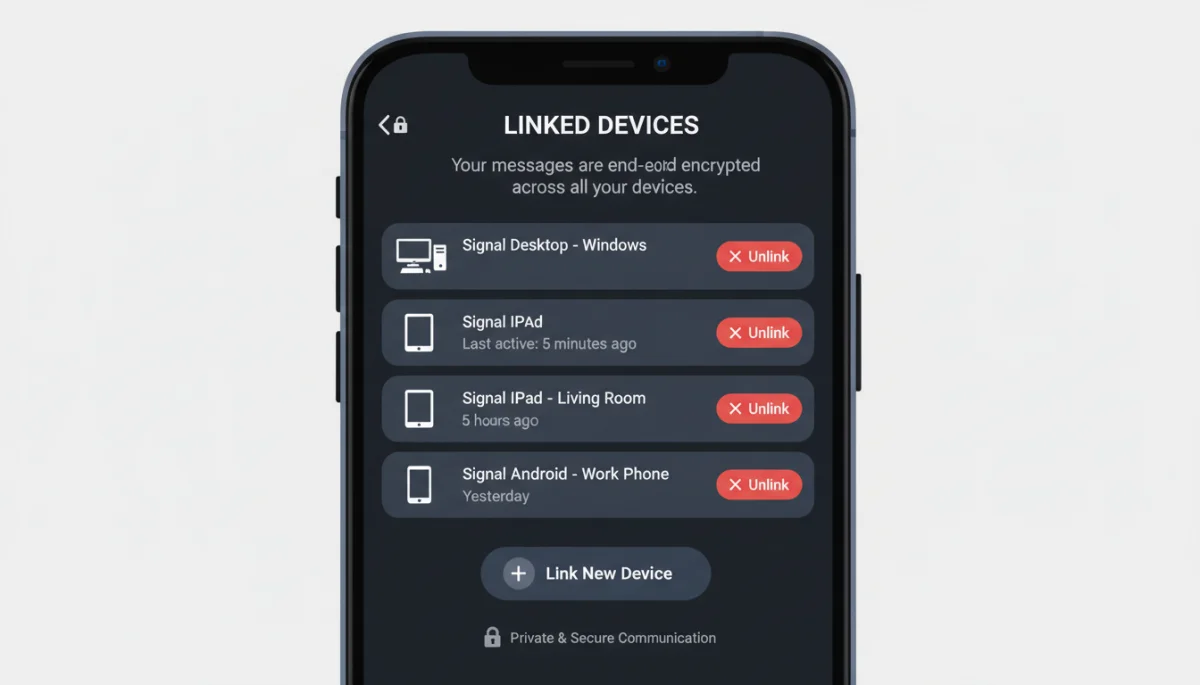
Signal’s independent device linking means that even if your primary phone is lost or stolen, your linked desktop client might still function, albeit with a warning about the primary device’s status. This independence underscores the importance of regularly reviewing and unlinking any devices you no longer use or trust. Maintaining a lean list of linked devices minimizes your attack surface.
best practices for device security across platforms
Effective management of linked devices extends beyond simply knowing where to click; it involves adopting a set of best practices that enhance your overall digital security posture. Whether you’re a WhatsApp or a Signal user, these guidelines are universally applicable and crucial for protecting your communications from unauthorized access. Proactive security is always the most effective defense.
The digital world is constantly evolving, and so too are the methods used by malicious actors to compromise accounts. By implementing these practices, you significantly reduce the risk of your private conversations falling into the wrong hands. It’s about creating layers of defense rather than relying on a single security feature.
key security recommendations
- Enable Screen Lock: Always secure your primary phone with a strong PIN, pattern, fingerprint, or face recognition. This is the first line of defense against unauthorized linking.
- Regular Device Audits: Make it a habit to check your linked devices list in both WhatsApp and Signal at least once a month. Remove any unfamiliar or unused devices promptly.
- Use Official Apps Only: Only download WhatsApp and Signal applications from official app stores (Google Play Store, Apple App Store) or their respective official websites. Avoid third-party clients.
- Beware of Phishing: Be skeptical of unsolicited messages or emails asking you to click on links to verify your account or device. Always go directly to the app to check your settings.
Additionally, consider the physical security of your devices. Leaving an unlocked laptop with an active WhatsApp Web session in a public place is an open invitation for a security breach. Logging out of sessions when you’re done, especially on shared computers, is a simple yet effective security measure. These practices are integral to successfully manage linked devices and maintain digital hygiene.
understanding the implications of linked device access
While the convenience of linked devices is undeniable, it’s vital to understand the potential implications if an unauthorized device gains access to your account. This understanding empowers users to make informed decisions about their security settings and react swiftly in case of a breach. The scope of access an unauthorized device has can vary, but generally, it’s extensive.
An unauthorized linked device essentially becomes an extension of your primary phone. It can read all your current and future messages, send messages as you, and even access your contact list in some cases. The ramifications for privacy and personal security are significant, ranging from identity theft to reputational damage.
potential risks of unauthorized access
- Message Interception: All your private conversations, including sensitive information, could be read by the unauthorized party.
- Impersonation: The unauthorized user could send messages posing as you, potentially leading to scams, misinformation, or damage to your relationships.
- Data Exfiltration: Access to your contact list and potentially media shared within chats could be extracted, leading to further privacy breaches.
- Account Takeover: In extreme cases, an unauthorized linked device could be used as a stepping stone to further compromise your main account or other linked services.
The key takeaway is that a linked device holds almost the same power as your primary phone for messaging purposes. Therefore, treating the management of these devices with the utmost seriousness is paramount. Understanding these risks reinforces the need to regularly manage linked devices and promptly remove any suspicious connections to protect your digital identity and communications.
troubleshooting common linked device issues
Even with careful management, users might occasionally encounter issues with their linked devices. These can range from a device failing to link properly to unexpected logouts or synchronization problems. Knowing how to troubleshoot these common issues can save time and frustration, ensuring your messaging experience remains seamless and secure. Most problems have straightforward solutions.
Troubleshooting often involves checking basic connectivity and software versions, but sometimes deeper issues related to account integrity or server communication might be at play. It’s always advisable to start with the simplest solutions before moving to more complex ones.
solving connectivity and sync problems
- Check Internet Connection: Ensure both your primary phone and the linked device have a stable internet connection. Poor Wi-Fi or cellular data can prevent linking or synchronization.
- Update Applications: Outdated versions of WhatsApp or Signal can cause compatibility issues. Always ensure both your phone app and desktop/web client are updated to the latest version.
- Restart Devices: A simple restart of both your phone and the linked device can often resolve temporary glitches.
- Clear Cache: For web clients or desktop apps, clearing the browser cache or reinstalling the desktop application can fix persistent issues.
- Re-link Device: If all else fails, try unlinking the problematic device and then re-linking it. This often resolves deeper synchronization errors.
If you suspect a security issue, such as an unauthorized login, the first step is always to immediately log out of all unknown or suspicious devices from your primary phone’s settings. Following that, changing your account’s PIN or password (if applicable) and enabling two-factor authentication provides an additional layer of security. Effective troubleshooting is part of comprehensively learning to manage linked devices.
| Key Aspect | Brief Description |
|---|---|
| Regular Audits | Periodically check and remove unfamiliar linked devices in app settings. |
| Security Features | Enable screen lock and two-factor authentication on primary and linked devices. |
| Official Apps | Only download and use official WhatsApp and Signal applications from trusted sources. |
| Unlinking Process | Know the steps to quickly unlink devices from your phone to revoke access immediately. |
frequently asked questions about linked devices
It is possible if they have temporary physical access to your unlocked primary phone. Linking typically requires scanning a QR code displayed on the new device with your phone. This highlights the importance of securing your primary device and regularly checking your linked devices list for any unfamiliar connections.
When you unlink a device, it immediately loses access to your account and can no longer send or receive new messages. Existing messages on that device might remain, but they will not synchronize with your active conversations. It’s crucial to log out to ensure no further access.
Both platforms offer strong end-to-end encryption for linked devices. Signal’s architecture provides more independent clients for each linked device, potentially offering a slightly more robust security model against certain types of attacks. However, user vigilance is key for both.
It is recommended to check your linked devices list at least once a month, or more frequently if you often use public computers or shared devices. This proactive approach helps identify and remove any unauthorized or forgotten connections quickly, maintaining your account’s integrity.
Yes, both WhatsApp and Signal allow you to link multiple desktop clients or web browsers. WhatsApp allows up to four linked devices, while Signal generally supports up to five. Always ensure you actively manage and unlink devices you no longer use to maintain security.
conclusion
Effectively knowing how to manage linked devices in WhatsApp and Signal is an indispensable skill in today’s digital age. This comprehensive guide has walked through the critical steps of reviewing, adding, and removing devices, coupled with essential security best practices and troubleshooting tips. By taking a proactive approach to managing your linked devices, you not only enhance your personal privacy but also fortify the security of your most sensitive communications. Remember, the convenience of multi-device access comes with the responsibility of diligent management. Regularly auditing your linked devices and adhering to security protocols will ensure your digital conversations remain private and protected, giving you peace of mind in an increasingly interconnected world.
